

What moves to AXL, and what you rebuild.
Contacts, orders, courses, video and files come across. Automations, funnels and pages get rebuilt. Active subscriptions are the hard part; this page says why.
Free plan, no card needed.
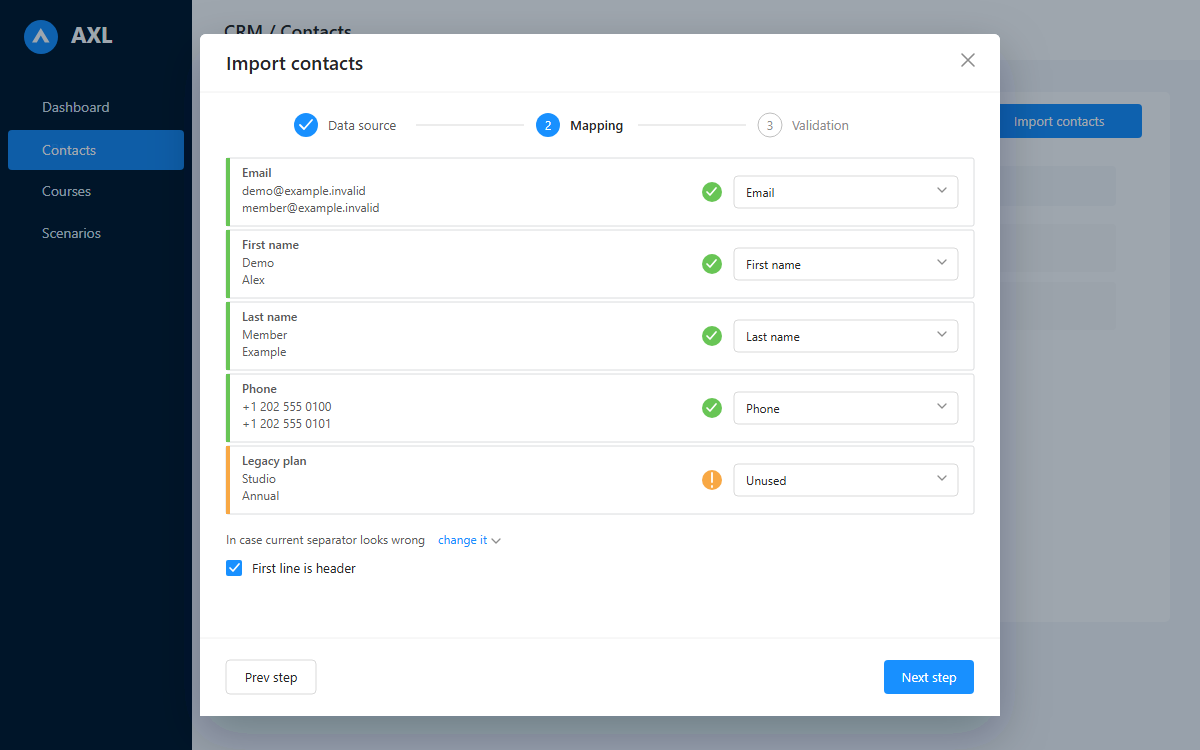
Map each CSV column first. Validation is a separate step before import.
What moves, who moves it and how long it takes.
| What | Who does it | How long |
|---|---|---|
| Contacts, tags, custom fields | Import wizard: TXT, CSV, XLSX or pasted text; name the session, map columns, check the preview, run | Under an hour |
| Course content and structure | You, or an AI agent through the API | Hours, not weeks |
| Video, files and PDFs | Upload to AXL's hosting | Depends on your library |
| Autowebinar event timelines | Imported: JSON or CSV, up to 10 MB | Per template |
| Landing pages | Rebuilt: cloned from a live URL | A page in minutes |
| Emails and templates | Rebuilt with the AI email builder | Minutes each |
| Automations and funnels | Rebuilt from your screenshots | The real work |
| Historical orders and payments | Export from the old platform; ask us what lands here as records | Depends on volume |
| Active subscriptions | The hard part: read this before you commit | Plan for weeks |
| Community posts and history | Not migrated: members arrive as contacts | Not applicable |
Eighteen steps, in the order that stops you losing something.
Three weeks is realistic. Steps 1 to 4 are the ones people skip and regret.
- 1Export everything while the account is still paid: contacts, orders, content, templates and analytics. Some platforms restrict exports after a downgrade.
- 2List every URL with inbound links or paid traffic. That is your redirect map.
- 3List every integration: payments, email sender, pixels, analytics, calendar, sync.
- 4Screenshot your automations first.
- 5Open a free AXL account. No card. Move to Starter before importing more than 500 contacts.
- 6Connect your payment provider: 20+ options, plus cash and bank transfer.
- 7Import contacts into the CRM. A mapped column with an empty value clears that field; tags and groups are only ever added.
- 8Settings → Domains: add the domain, point an A record at the value AXL shows, tick “DNS applied”, confirm. SSL issues itself.
- 9Rebuild core pages, or clone them from a live URL with the AI page builder.
- 10Upload video, or import by URL from Google Drive, Dropbox, OneDrive or Zoom. Saving the embed domain list replaces the previous one.
- 11Build courses, lessons, tests and assignments, or hand an agent the outline.
- 12Rebuild email templates and sequences.
- 13Rebuild automations. Delete the flows nobody remembers writing.
- 14Set redirects: use 301 for anything with search equity.
- 15Warm the sending domain. A 20,000-person blast from a fresh sender is a deliverability incident.
- 16Move new purchases to AXL checkout; leave subscriptions alone.
- 17Migrate subscriptions in cohorts, with a heads-up email.
- 18Keep the old account read-only for 60 days.
What to plan for before you switch.
Active subscriptions are the real cost of switching
AXL owns recurring billing rather than delegating it to your gateway: retry ladders, grace periods, renewal caps, self-service pause. That is why an existing subscription cannot be teleported in. Card credentials live with your payment provider, so whether a token can move at all is a question for them.
Plan it as a project. In bulk you can grant product access here for a period while the old billing still runs, pause renewals on your side as each cohort re-subscribes, then suspend the old access. Tell us your provider and your volume.
- Course URLs change Redirects are per page, plus one domain rule with a 301/302 switch. No bulk map. A long list is hand work.
- Deliverability resets Reputation is per domain. Ramp over a week or two.
- Private podcast feeds They need another host; that subscription stays.
- No student app in the stores The portal is a web app on your own domain.
Seven starting points.
Contacts, students and course structure export cleanly from all seven; below is what does not. Figures read on each vendor's own pricing page unless stated.
From Kajabi
Plan for: rebuilding themes; a new home for the podcast.
Leaving Kajabi: the contact ceiling, not the price. Basic is $179/mo for 2,500 contacts; Growth is $249/mo for 25,000 (kajabi.com/pricing).
From Teachable
Plan for: losing BackOffice, which handled payouts and tax for 2% to 2.8%. Get your tax answer first.
Leaving Teachable: the 7.5% fee on the $39/mo Starter plan, and API access starting at Growth, $189/mo (teachable.com/pricing). At ~$520/mo in sales the fee equals the plan.
From Thinkific
Plan for: a bigger migration than the course export. You are probably running email, CRM and funnels elsewhere too.
Leaving Thinkific: consolidation. Basic is $54, Start $109, Grow $219 and Expand $499 a month. In qualifying regions, using your own provider adds 5% / 2% / 1% / 0.5% by tier on the first $1M of annual sales. API and webhooks start on Grow (thinkific.com and support.thinkific.com, checked 21 August 2026).
From GoHighLevel
Easy: contacts, pipelines and opportunities map almost one for one.
Plan for: agency features AXL does not have: SaaS mode and reselling the platform to clients.
Leaving GoHighLevel: the sticker price is a floor: $97 / $297 / $497 a month, plus AI Employee at $50 to $97 per sub-account, HIPAA at $297/mo, a white-label app at $497/mo, and metered numbers, SMS and email (gohighlevel.com/pricing). Their memberships product does include courses, quizzes with a settable pass mark and certificates issued by a workflow action (help.gohighlevel.com). We found no cohorts or native webinars in their docs. That is not the same as saying they have none.
From ClickFunnels
Plan for: rebuilding page designs. Clone from live URLs and drop what never converted.
Leaving ClickFunnels: the course cap. Launch is $97/mo for three, rising to 6, 10 and 20 above (clickfunnels.com/pricing).
From Skool
Plan for: losing the archive; run both in parallel. Third-party trackers report no public REST API and no official webhooks, so no scripted export (tools4skool.com/integrations/skool-api).
Leaving Skool: the transaction fee: 10% on Hobby at $9/mo, 2.9% on Pro at $99/mo (skool.com/pricing). Their page does not say whether card processing sits inside it; work it both ways.
From Circle
Plan for: post history staying behind, and rebuilding your workflows.
Leaving Circle: a fee that never reaches zero: 2% on Professional at $89/mo, 1% on Business at $199/mo, and 0.5% on custom-priced Circle Plus. Email Hub adds $99/mo for 10,000 contacts (circle.so/pricing).
Running something else? The shape barely changes. Tell us what you are on →
Send us your setup and we will tell you what will be annoying.
What you run, how big it is, how many active subscriptions and who bills them. You get a written assessment, including the parts that will take the most work. No card, no call.
Ask about my migration →What people ask before they move.
Not as a single step. Card credentials live with your payment provider, and AXL owns the recurring billing itself. Treat it as a project: new purchases first, then cohorts, old billing running until each is across.
Filter the base for possible duplicates, then merge up to five contacts at a time, choosing field by field which values survive. Purchases, courses, payments and chat history come with the merge. It cannot be undone, so merge after the last import, not between two.
Community posts and threads, private podcast feeds, and your sending reputation. A branded student app in the stores is not something AXL provides either.
Build the shell first. Decide afterwards.
Rebuild one page and one automation before you touch a live subscription. Expect a few weeks of paying both platforms. From $49 a month on Starter; your bill depends on usage.
Free plan, no card needed.