

Connect ChatGPT and Codex to AXL
Add the server in ChatGPT's MCP settings, or point Codex at it through mcp-remote. Then a browser sign-in, with no key to paste, and the agent has tools over your CRM, sites, courses, automations and email.
1 · Add the server
In ChatGPT, open Settings → Plugins → MCP, click Add server, and paste the URL.
https://app.axl.tech/mcp
For Codex we recommend Code mode. It has no native HTTP transport, so it goes through mcp-remote, which also handles the browser sign-in:
{"mcpServers":{"axl":{"command":"npx","args":["mcp-remote","https://app.axl.tech/mcp"]}}}
Path checked against the current ChatGPT app rather than the help pages, which still described an older developer-mode flow that day. Trust the app. Read the full ChatGPT and MCP walkthrough →
2 · Sign in
Your browser opens on an AXL consent screen. It names the client that asked and shows which account the agent will act as; if you administer more than one, switch there before approving. What the client receives is an ordinary admin access token scoped to that account, which is why the agent inherits your permissions rather than a separate set.
3 · Ask for something
“List my active automations and tell me which ones have never run.”
Codex in Code mode for multi-step work; ChatGPT for asking questions of the account. What an agent can finish →
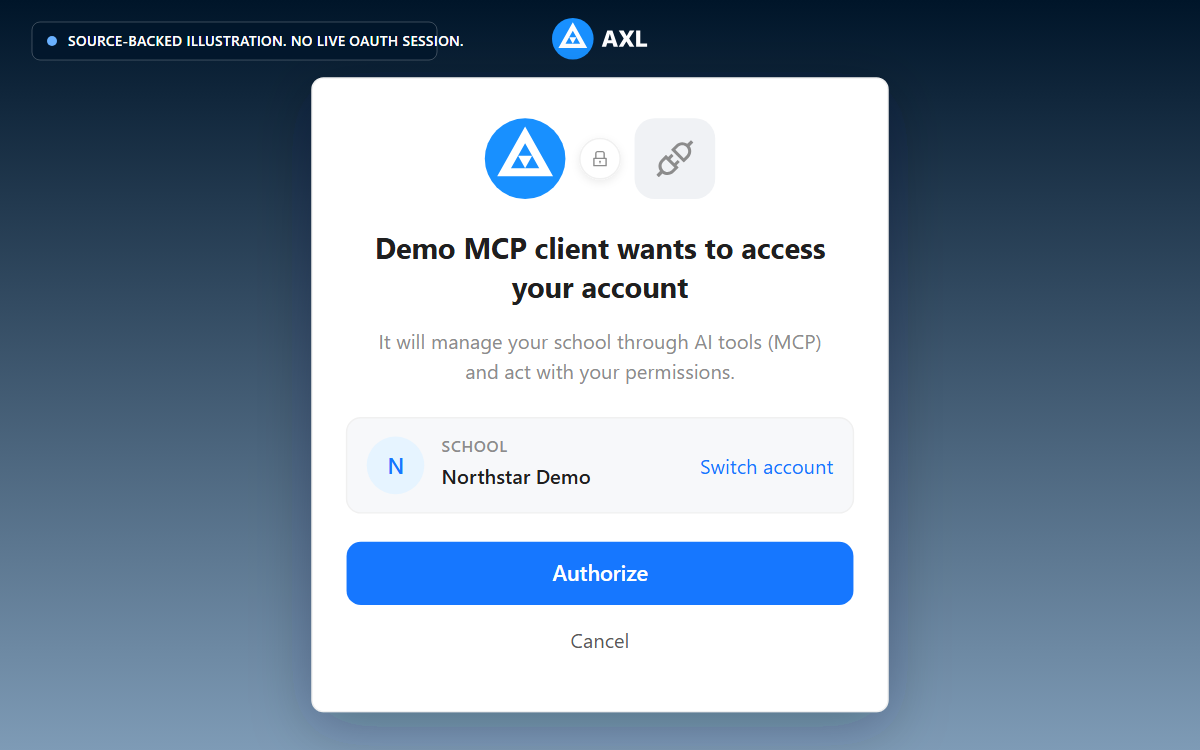
Review the school and access request before you approve the connection.
If it does not work
- •The MCP section is not where this page says. ChatGPT has moved it more than once. Look for connectors or developer settings in your build. Then tell us so we can fix this page.
- •The browser never opened. The client registers itself first, and that step fails quietly if the URL is not exactly the endpoint. Re-check it, then remove and re-add the server.
- •Approval failed with “no school”. The token is scoped to an account and you have not created one yet. Finish that, then connect.
The agent acts as you, with your permissions, in one account. It writes without publishing (publishing and sending are separate steps you ask for), and 21 sensitive operations are not on its surface at all. What an agent can never do →