

The same API the admin panel runs on
When a feature ships in the interface, its operations are on the API the same day. Everything here is version one, under /api/v1/.
Create a key carrying only the rights the job needs, name the fields on every read, count before you list, and pace against a concurrency limit rather than a quota.
Everything you need before the first call.
| What | Value |
|---|---|
| Base URL | https://app.axl.tech/api/v1/: JSON over HTTPS, REST-flavoured |
| Surface | ~1,100 operations across 60+ modules, the ones the admin panel calls |
| Conventions | String ids, never integers. Mostly 22-character short GUIDs. UTC in every date field, both directions. Soft delete by default: a deleted record is flagged, not erased. Custom fields are read and written by their Latin key. |
| Paging | Reads page with take and skip; add useItemsTotal and the same call returns the count. |
| Response envelope | {"success":…,"body":…,"errors":[…]}; every error carries code, type, message and often the field it refers to |
| Documented where | A published interactive reference, generated from a localized OpenAPI document you can download and load into Postman: contacts, courses, products, orders, payments, certificates, scenarios and the partnership endpoints. The rest behave identically, described by the MCP schema tools. |
Four jobs people wire up first.
-
Contacts and orders in
From your checkout or back office, using standard fields, tags, groups and custom fields.
-
Automations from your system
One request runs any active scenario for a contact, carrying your own payload. The endpoint →
-
Numbers back out
Orders, payments, course progress and campaign results, on your schedule.
-
Files in and out
Upload the bytes, then attach the file to a lesson or a product.
REST reads and writes; webhooks carry events, since there is no subscriptions API. MCP is the same surface for an agent.
Each key carries its own rights.
Create keys in Settings → API Keys, then open one to copy it and set its rights (the same permission tree that governs a human admin, down to the restricted-field right). A key that triggers one automation gets the “run scenario” right and nothing else; it cannot read your contacts.
Keys are unlimited, so one per job costs nothing. REST also keeps the writes that are removed from the agent surface (billing, tokens, roles), so a scoped key is how you script that work.
- •The value you copy already includes the
Bearerprefix. A GET-only caller may pass the raw key as?admin_access_token=, but prefer the header; a key in a URL lands in logs. - •Keys are long-lived: keep one in a secret manager and delete it when the job ends. Deleting the key is the revocation.
- •Agents do not use keys at all. The MCP endpoint runs OAuth 2.1, so nothing long-lived reaches a config file. The flow →
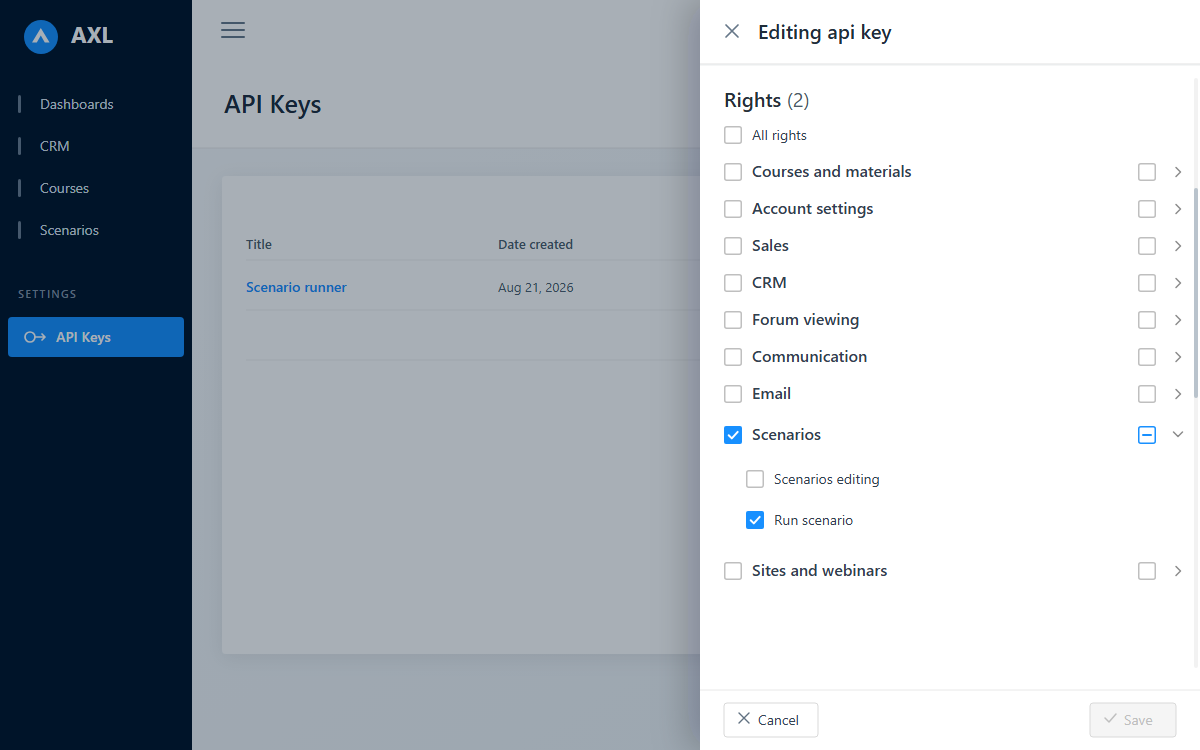
Choose exactly what an API key can do before you save it.
One call, then five behaviours that surprise people once.
GET https://app.axl.tech/api/v1/crm/lead?fields={id,firstName,email,tags{id,text}}&take=50&skip=0&useItemsTotal=true
Authorization: Bearer <your-api-key>
200 {"success":true,"errors":[],"body":{"items":[…],"filter":{"itemsTotal":128}}}
Contacts live under crm/lead; the count rides back on the echoed filter.
- 1The field selector is usually required. These entities are wide, so a read without one errors with
mustSpecifyFieldsToSelectrather than defaulting to everything. - 2An unknown field name 500s the whole call: a bad filter degrades quietly, a bad field name does not. Read a 500 here as your own typo; names come from the OpenAPI document.
- 3An unsupported filter condition is ignored silently:
200and the wrong rows, never an error. Cross-check a filtered read against the module's count operation, oruseItemsTotalon the same read. - 4Updates are patch-shaped.
{"value":x}sets,{"value":null}clears, an omitted property is left alone. A bare value does not bind and is dropped in silence, which reads exactly like “the server ignored me”. - 5A single-entity update replaces a collection; a bulk action adds to it. And on a bulk action an empty or missing filter targets every record in the account, the most dangerous shape in the API. The agent surface guards it; REST does not, because the admin panel performs it too. Scope your filters.
74 filter types, one grammar, three property names.
The extended filter is the language the CRM segment builder speaks. 61 of the 74 work in contact segments and broadcast audiences; the other 13 test an automation's run context rather than the contact, so they mean nothing in a list query. Conditions are camelCase strings (contains, moreThan, notSpecified), and so are nested enums. The same grammar in the interface →
| Where | Property | Encoding |
|---|---|---|
| Contact lists and counts | extendedFilter |
JSON object |
| Broadcasts, promo audiences | extendedFilterJson |
the same JSON, as a string |
| Saved filters | filterJson |
the same JSON, as a string |
Files upload in three steps, not one post
Begin with a JSON call describing the file; the server sizes the parts and returns one pre-signed URL each. Upload the bytes by PUT to each URL with no Authorization header (the signature is in the URL and an auth header voids it), keeping each ETag verbatim. Complete as the admin who began.
Download links are pre-signed and expire after six hours, so generate them when you need them.
Concurrency, not a request quota
There is no requests-per-second cap. Machine callers get a fixed number of requests in flight at once. Ten thousand calls in a row is fine, four at the same moment may not be.
- •Over it:
429withRetry-After: 1, plusX-Concurrency-LimitandX-Concurrency-Remaining. Read those headers rather than hard-coding a number: they are authoritative for your account right now. - •Browser sessions are never throttled. The limit stops one runaway script degrading an account; it is not a tier to buy.
- •It fails open: if the throttling layer is unavailable, requests pass through.
- •A negative balance locks the API: everything but billing reads answers
403 lockedSchoolAccessDenied, and no backoff clears it. A failed invoice stops a nightly job until the account is topped up.
Before you wire anything up.
At app.axl.tech/api/public, browsable and open, with the OpenAPI document downloadable from the same page. It covers contacts, courses, products, orders, payments, certificates, scenarios and the partnership endpoints; everything else behaves the same way and is described by the MCP schema tools and the knowledge base.
The API and webhooks are part of AXL. Paid platform plans start at $49 per month with included usage and published overage rates. Work out your number →
Not today. Download the OpenAPI document from the reference and generate one in your own language; the same file imports into Postman as a collection.
One key, one job, one afternoon.
Create the key, scope it to the one job, make the call above.
Free plan, no card needed.