

Webhooks, in both directions
Both live inside a scenario, the admin's word for an automation, so a webhook can sit between a wait and a condition and be branched on.
Outbound: a scenario calls your endpoint and branches on the answer. Inbound: one HTTP request starts an active scenario for a contact, matched or created by email.
From an automation to anywhere.
The node is Send webhook, in the editor's Integrations group under Settings → Scenarios. Set the method explicitly: the backend and editor defaults differ, and GET sends no body. Headers take any pairs, including your own Authorization. The body is raw with a media type you choose, multipart, or form-urlencoded. Every text field accepts scenario tags, so the request carries this contact's data.
Branching on the answer. The status code and body land in the run's context: JSON as-is, XML converted, plain text wrapped. A later condition reads them through the WebhookData filter, keyed on StatusCode or a body path like result.id. Comparisons run on trimmed, lower-cased strings, so compare numbers as strings. A run holds one webhook answer, so branch before a second Send webhook overwrites it.
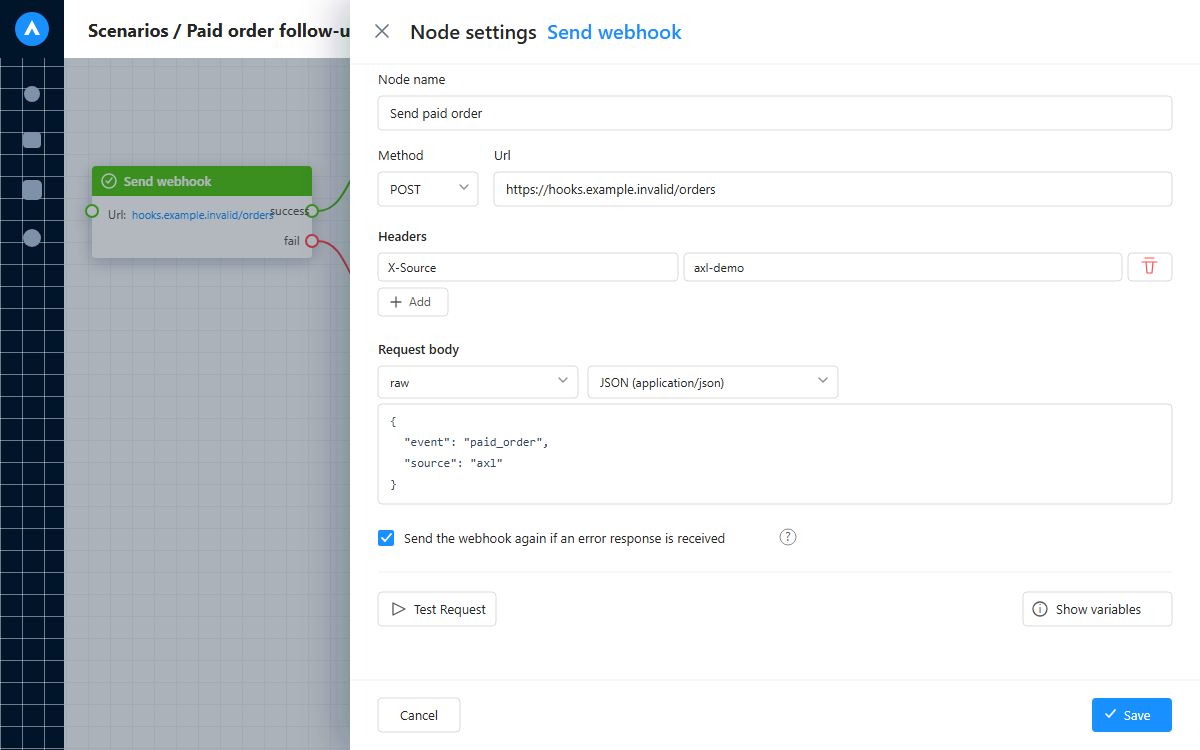
Send structured data with your own method, headers, body, and retry settings.
| Behaviour | Exactly |
|---|---|
| Timeout and size | 10 seconds, fixed. Responses are capped at 1 MB. A larger one fails the step immediately, with no retry. Slow work: answer at once, work asynchronously. |
| Success and failure | Any 2xx takes the success branch, anything else the fail branch. Transport errors and timeouts become status 500, with the exception text as the response. |
| Retries | Opt-in. Switch on the node's repeat option and a failed call retries up to 10 times, backing off 1, 5, 10, 15, 30, 45, 60, 150, 300 and 500 minutes; the last attempt about 18½ hours after the first failure. Off, the first bad response takes the fail branch. |
| Testing and logging | Test Request fires the call from the node and shows the status code, timing and body before anything is live. Every real call writes the full request and result, success or not, to the contact's history. |
Trigger: form submitted → Send webhook
POST https://api.yourcompany.com/leads · Authorization: Bearer …
{"email":"{contact.email}","name":"{contact.firstName}","source":"axl"}
→ Condition (WebhookData: StatusCode equals 200) · success: tag “synced” · fail: task
SMS needs no webhook; it is a native channel: Twilio and RingCentral send straight from a scenario, billed per message on top of your subscription, on your own provider account.
One call starts any active automation.
- 01 Build a Simple scenario One start trigger. Switch it on. Settings → Scenarios
- 02 Copy the id From the editor's address bar. The scenario editor
- 03 Mint a scoped key Run scenario right, nothing else. Settings → API Keys
- 04 POST the body The run starts behind the response. Your own system
POST https://app.axl.tech/api/v1/scenario/run
{"scenarioId":"…","contactData":{"email":"person@example.com","firstName":"Alex"},"data":{"order":{"sum":500}}}
- •Send
scenarioId, plus acontactIdor acontactDataobject with at least an email. Neither, and it is rejected. - •Find or create, on email alone. No contact with that email and one is created, otherwise it is reused. Either way the fields you sent update it: standard fields,
tags,groups, and custom fields addressed by API key. Phone and custom fields never match: two emails means two contacts. - •
datais not contact fields. It is the run's own payload, nesting allowed, read by a condition through theDynamicDatafilter on a dotted path: the body beside this isorder.sum. - •Only a Simple scenario starts this way: the standalone kind, not one attached to a course, channel or pipeline. Any other kind, or a wrong id, returns
scenarioNotFound; a switched-off onescenarioDisabled; a key missing the rightaccessDenied. The call returns the resolved contact id. - •A
GETform exists for systems that can only build a URL; use it only when you must, since a token in a URL lands in the logs.
Full walkthrough with screenshots: calling the scenario via the API. Response shape and concurrency limits: the REST API page.
Two that decide how you build.
No signature comes from us. The only credential is the header you set on the node; put a secret in it and check that.
You wire it rather than subscribe to it: put an outbound call inside the automation that reacts to that event. There is no separate subscriptions API. The trade is that you get the whole automation's filtering and branching for free.
Put your own system in the middle of the flow.
No plan gate: the webhook node and the run endpoint ship on every account.
Free plan, no card needed.