

The same API the admin panel calls, with an MCP endpoint in front of it.
Contacts, deals, courses, products, orders, sites, email, webinars and automations. Use an API key with the rights you choose, or sign in from your AI client. Same operations and permission checks as the admin panel.
claude mcp add axl --transport http https://app.axl.tech/mcp Then sign in in your browser. No key to paste, no secret in a file, no developer plan to buy first.
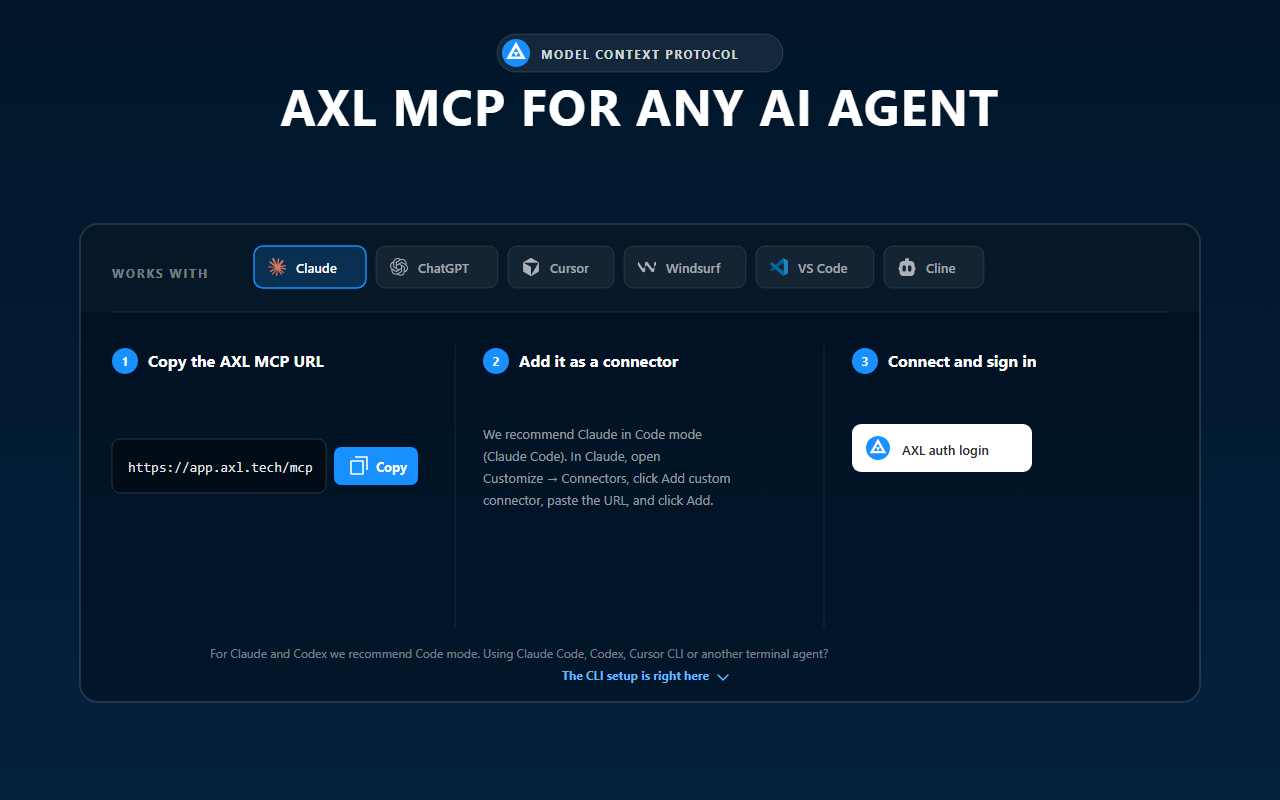
Choose Claude, copy the connection details, and finish setup in your client.
Everything you need before you write a line.
| What | Value |
|---|---|
| MCP endpoint | https://app.axl.tech/mcp: Streamable HTTP, JSON-RPC over POST only, stateless. The admin shows it under Settings → MCP |
| REST base URL | https://app.axl.tech/api/v1/: JSON over HTTPS |
| Agent auth | OAuth 2.1 with dynamic client registration and PKCE; S256 and state are required, not optional |
| Machine auth | An API key in an Authorization header; the value you copy already carries Bearer. Created in Settings → API Keys, rights set per key |
| Surface | ~1,100 operations across 60+ modules, using the same calls as the admin panel, not a subset that lags behind it |
| Conventions | String ids, never integers: 22-character short GUIDs, 36 in a few tables. UTC in every date field. Soft delete by default: a deleted record is flagged, not erased. |
| Response envelope | A success flag, a body, and an errors array carrying code, type, message and often the field |
| Limits | Concurrency, not requests per second: 429 with Retry-After: 1 plus X-Concurrency-Limit and X-Concurrency-Remaining, which are authoritative; read them rather than hard-coding. Sequential calls are unlimited, browser sessions are never throttled, and it fails open |
| File links | Downloads are pre-signed and expire after six hours; generate them when needed, do not store them |
| Response cap on MCP | Roughly 200,000 characters, then truncation with a hint to narrow the fields or paginate. REST is not capped |
| Locked account | A negative balance answers everything but billing reads with 403 lockedSchoolAccessDenied, carrying a billing link and a do-not-retry hint |
MCP tool reference
| Tool | Purpose |
|---|---|
capability_map | Maps the account surface and the rules between modules. |
list_recipes · search_docs | Finds a proven workflow and the product guidance behind it. |
list_modules · list_operations · search_operations | Finds the operation that matches the requested job. |
get_operation_schema · get_fields_schema | Returns parameters, request bodies, responses and selectable fields. |
get_extended_filter_schema · get_scenario_node_schema · get_quiz_item_schema · check_scenario_node_payload | Explains and validates shapes that a plain operation schema cannot express. |
invoke_operation | Runs one operation. This is the only call in the set that writes anything. |
Want to see what an agent can finish? What an agent actually finishes →
Get a credential, read, then write.
- 01 Get a credential A key you scope, or a browser sign-in. Settings → API Keys
- 02 Read before you write Count the rows a filter matches first. The count operation
- 03 Pace on the headers Not on a timer of your own.
X-Concurrency-Remaining - 04 Then write Publishing and sending stay separate calls.
Four pages, one surface.
-
The MCP endpoint
Add the server, sign in in the browser, approve the named client. Your agent then gets a small fixed tool set, of which exactly one call writes anything.
Transport, the OAuth 2.1 flow and every client → -
Credentials
OAuth hands an agent an ordinary admin token with the approving admin's rights. A key is narrower: one that triggers an automation cannot read your contacts.
Creating and scoping API keys → -
The REST API
An unsupported filter condition is ignored silently:
Fields, filters, writes and files →200and the wrong rows, never an error. Cross-check every filter against the count operation. -
Webhooks, both directions
Not a subscriptions API. Outbound, a scenario node calls your endpoint and branches on the answer; inbound, one POST starts any active automation.
The scenario-run endpoint, with its body →
Each client has a setup page under /developers/mcp: Claude, ChatGPT and Codex, Cursor, Windsurf, VS Code, Cline. Anything else that speaks MCP goes through mcp-remote.
The website chat SDK
Open the chat from your own button, change it per page, show a hint when your code decides, sign in customers with a token from your server, and listen for form and message events.
Website chat for developers →The limits sit in the server, not in a prompt.
21 sensitive operations (credentials, rights and roles, billing writes) are removed from the agent’s catalog: it cannot list, find or run them. A test fails the build if one comes back.
Large deletes and similar risky calls stop on the first attempt and ask for confirm=true. The agent can set that flag itself, so it is not proof that a person approved. For a hard limit, use key rights: a right the token does not have cannot be talked around.
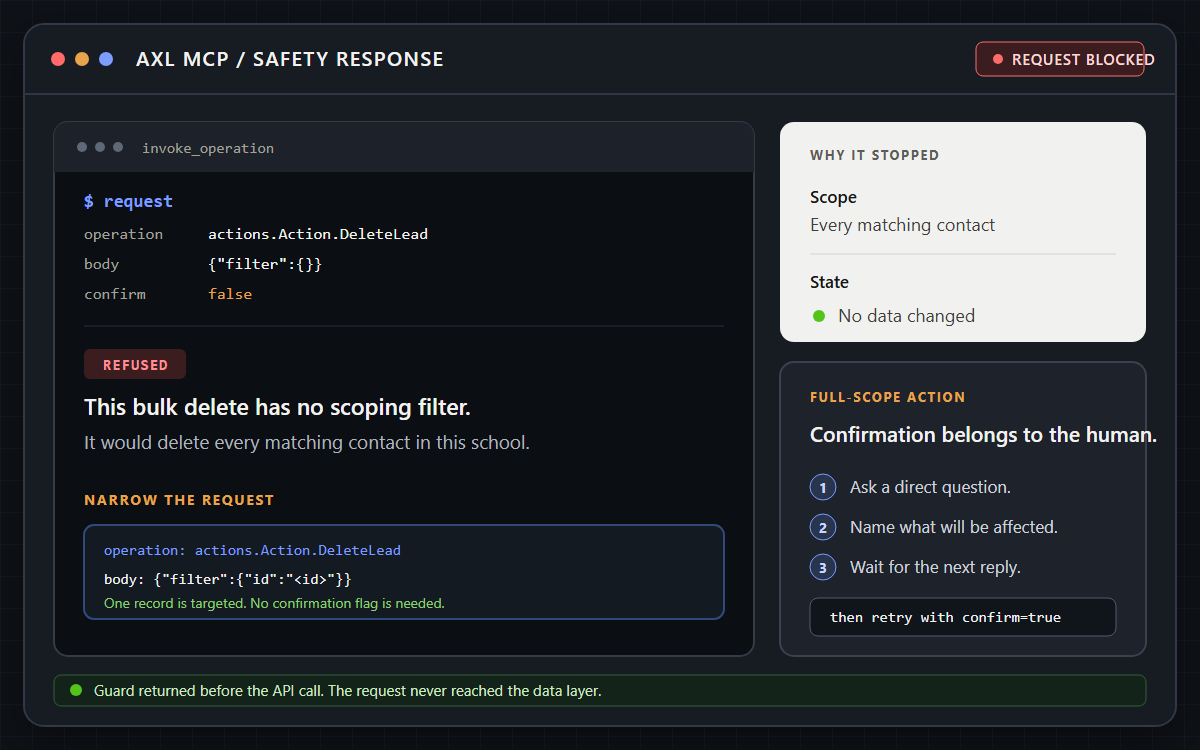
Risky requests stop before the API call and return a safer next step.
What builders ask before they wire anything up.
The API, webhooks and bring-your-own-agent connection are part of AXL. Paid plans start at $49 per month with included usage; your agent's own model usage is billed by the provider you run it with. Work out your number →
Published and open at app.axl.tech/api/public, with the localized OpenAPI document downloadable from the same page: contacts, courses, products, orders, payments, certificates, libraries, scenarios, homework verification and the partnership endpoints. The rest are documented through the schema tools on the MCP surface and the knowledge base.
Through the ordinary history timeline, which records agent writes exactly as it records yours, and the deep link each successful write returns. The limit, precisely: only operations that already write history events show up there, and there is no agent-only log.
Connect your agent to a free account.
Sign in once in the browser, or create an API key scoped to one job.
Free plan, no card needed.