

Get more registrants to show up.
AI calls and messages to people who registered, with the next step chosen by what they did.
Free plan, no card needed.
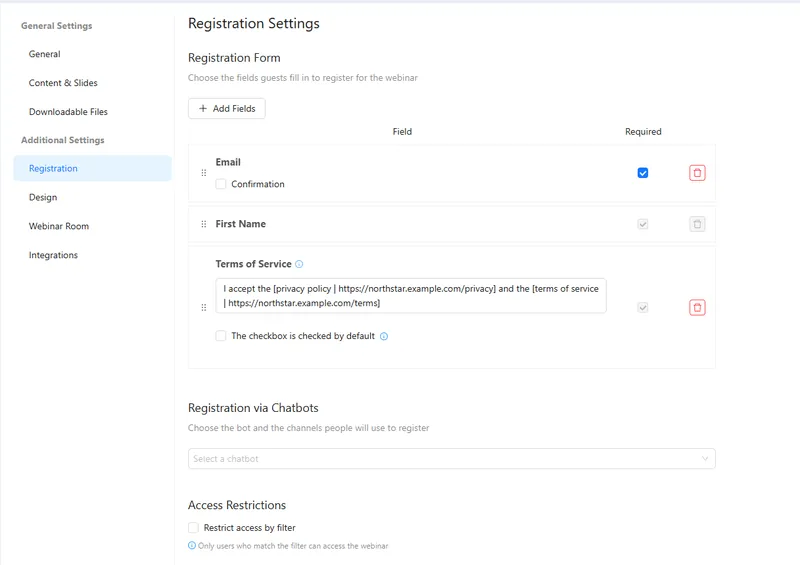
A webinar registration page.
More registrants show up, and every one gets a follow-up.
Before the webinar, an AI agent reminds people and answers practical questions. After it, each attendee gets the next step that fits.
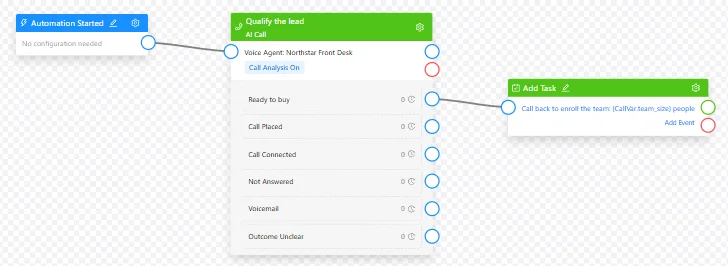
- Reminders. Calls or messages with the time and the link.
- Questions. The agent answers from the event details.
- No answer. Voicemail and no-answer get their own path.
- After the event. Replay, consultation or offer, by attendance.
Good to know: Reminder calls go only to registrants who agreed to them, and a person confirms each campaign.
Four parts of AXL a webinar team uses.
- Webinars Live and automated webinars with registration. Webinars →
- Voice AI Reminder and follow-up calls. Voice AI →
- Automations Branches by attendance and call result. Automations →
- Email Reminders and replays by email. Email →
Your reminder sequence before the next webinar.
- 01 Prepare the event details Time, topic and joining link. Webinars → Event
- 02 Choose the audience Registrants who agreed to reminders. Event → Registrants
- 03 Set up the agent What it says and answers. AI agents → Voice
- 04 Test the sequence A test registration and reminder. Scenarios
Help me configure a reminder for registered webinar attendees. Explain when it starts and how to join, answer practical questions and use the call outcome for follow-up.
- 1. Creates a reminder agent with the webinar time and link.
- 2. Answers practical questions about joining.
- 3. Adds a branch for each call outcome.
- 4. Leaves the campaign for you to confirm.
Paste it into the AI Assistant inside AXL, or into Claude, ChatGPT or Cursor connected over MCP. How webinars work →
Webinars priced by the hours you stream.
One 1-hour session a month with 300 viewers.
| Job | Usual tool | Monthly | In AXL |
|---|---|---|---|
| Webinars | Zoom Webinars | $105.99 | Webinars with Q&A and reports |
| Webinars | WebinarJam | $99 | Live and automated webinars |
| Webinars | GoTo Webinar | $69 | Webinars, reminders, polls |
| Webinars and follow-up | AXL | $55 | Starter plus streaming above 100 viewer-hours |
List prices billed monthly, 23 October 2026, from zoom.us, webinarjam.com and goto.com. AI reminder calls are billed by usage. AXL rates and usage allowances on axl.tech/pricing.
Questions people ask.
Registrants who agreed to reminders. A person confirms each call campaign.
No answer and voicemail each get their own path, such as a text or an email.
Yes. Branch on whether they attended and for how long.
No. Webinars, registration and replays are part of AXL.
Bring more registrants to your next webinar.
Free plan, no card needed. Paid plans from $49 a month.
Also for: Call centers · Sales teams · AI receptionists · Service businesses · All solutions