

Product film · 1 min
More bookings, upsells and revenue
AXL AI receptionist
Every call answered. Every next step handled.
Answer questions, qualify callers, book appointments, recommend the next offer and follow up, with phone, calendar and CRM already connected.
Workflow story · 90 sec
From setup to a booked appointment
Free PDF guide
7 AI workflows for home service businesses
Get the practical guide to handling calls, booking jobs and following up with customers, with examples for everyday work in your service business.
- Calls & booking
- Estimates & job reports
- Customer follow-up
Download free PDF
10 pages · PDF · 176 KB
Opens in a new tab. No signup needed.
What it is
An AI agent that answers your phone and books appointments.
Give it your services, hours and booking pages. It answers questions, finds a free time and saves the call for your team.
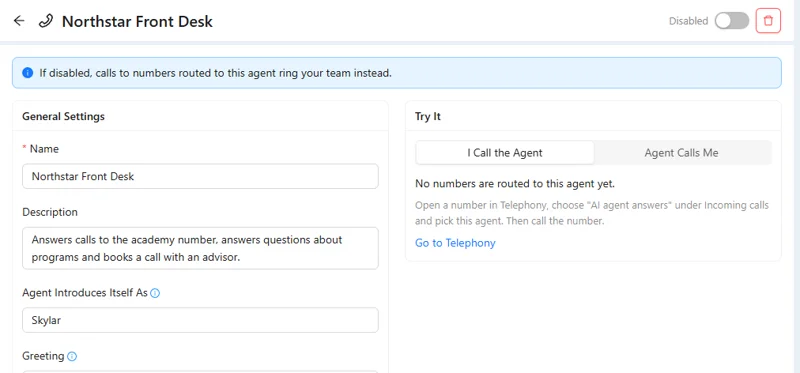
- Answers. Hours, services and prices from your facts.
- Books. Free times from the booking pages you attach.
- Records. Recording and transcript in call history.
- Improves. Adjust instructions, voice speed and interruptions.
Good to know: US and Canada numbers. Calls and AI minutes are billed by usage.
What you use
Four parts of AXL a receptionist uses.
- Voice AI The agent, its voice and its instructions. Voice AI →
- Telephony The number it answers. Telephony →
- Booking The calendar it books into. Booking →
- CRM Every caller saved as a contact. CRM →
How to start
Your receptionist live today.
- 01 Add the business facts Services, hours, common questions. AI agents → New
- 02 Attach booking The pages it can book into. Agent → Booking
- 03 Pick a number Buy one or use a number you own. Telephony → Numbers
- 04 Call it yourself Try a booking and an odd question. Test call
Or let AI do it
What it does
Prompt
Create a receptionist for our business. Answer questions about services and opening hours, ask which appointment the caller needs and book an available time.
- 1. Creates a voice agent with your services and hours.
- 2. Asks which appointment the caller needs.
- 3. Books a free time from your booking page.
- 4. Leaves the number unchanged until you switch it on.
Paste it into the AI Assistant inside AXL, or into Claude, ChatGPT or Cursor connected over MCP. How AI calls work →
What it replaces
One plan in place of a phone line and a scheduler.
On AXL the receptionist, the number and the calendar sit in one account.
| Job | Usual tool | Monthly | In AXL |
|---|---|---|---|
| Business phone | Quo Starter | $28 per user | Numbers and calls |
| Booking | Calendly Standard | $12 per seat | Booking pages |
| All of it | AXL | Free; paid from $49/month | Plus numbers, minutes and AI calls by usage |
Vendor prices from quo.com and calendly.com, billed monthly. AI call rates on axl.tech/pricing. AXL rates and usage allowances on axl.tech/pricing.
Questions
Questions people ask.
What you put in its instructions: services, hours, prices and common questions.
Yes, into the booking pages you attach, at times that are actually free.
Yes. Every call has a recording and a transcript in call history.
The plan, plus the number, the minutes and the AI call time. Rates are on the pricing page.
Let AI answer your next call.
Free plan, no card needed. Paid plans from $49 a month.
Also for: Call centers · Sales teams · Service businesses · Webinar teams · All solutions